 SLON Privacy
Install Slon Privacy on Multiple Devices
You can use Slon Privacy on your computer, phone, and tablet, and set it up on devices used by people close to you. One subscription supports up to 3 devices.
You can sign in to your account on another device or securely share your subscription using a QR code — without sharing your password or access to your profile.
Sign in to your account on another device
This is the easiest option. On the new device, sign in to your Slon Privacy account using Telegram or Email, then install the app and add your subscription using the guide for your platform:
Share your subscription using a QR code
This method lets you connect another device without giving access to your account.
- Open your Slon Privacy account on your device.
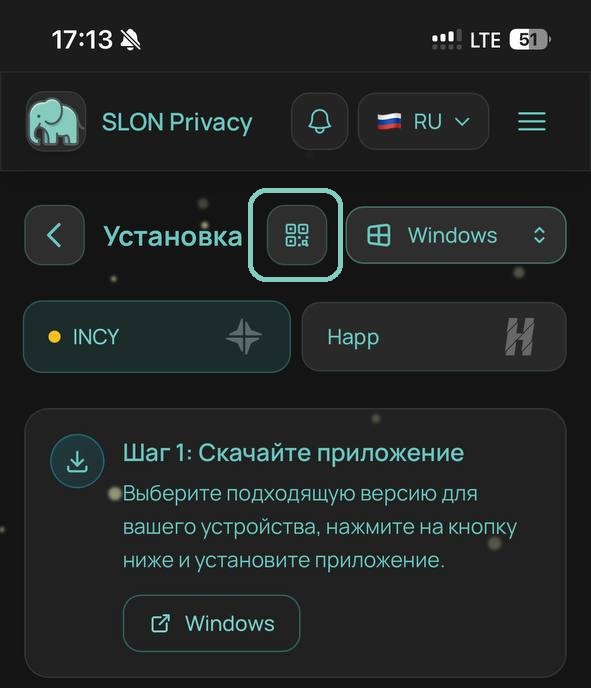
- Go to the option for connecting a new device.
- Select the required platform and the app installed on the other device — Happ or INCY.
- Click the subscription QR code button.
- Save the QR code and send the image to the other device using any convenient method.
Add the QR code to Happ
Save the QR code you received to your Gallery. Open Happ and tap:
“+” → “QR Code” → “Gallery” → select the saved QR code.
Your Slon Privacy subscription will be added automatically.
Video guide for Happ
Adding a Slon Privacy subscription from a saved QR code.
Add the QR code to INCY
Save the QR code you received to your Gallery. Open INCY and tap:
QR code icon → “Choose from Gallery” → select the saved QR code.
Your Slon Privacy subscription will be added automatically.
Video guide for INCY
Adding a Slon Privacy subscription from a saved QR code.